

The Memory Problem
In our second AI Academy session, we tackled a fundamental limitation that anyone who has used simple chatbots will recognize: they forget everything the moment you start a new conversation.
Imagine working with a collaborator who has total amnesia about every previous discussion. Each time you meet, you'd waste enormous amounts of time re-explaining your project goals, your methodology, your data sources—all the context that makes your work specific to your discipline and institution. This is precisely what happens when we use AI in its default, conversational mode.
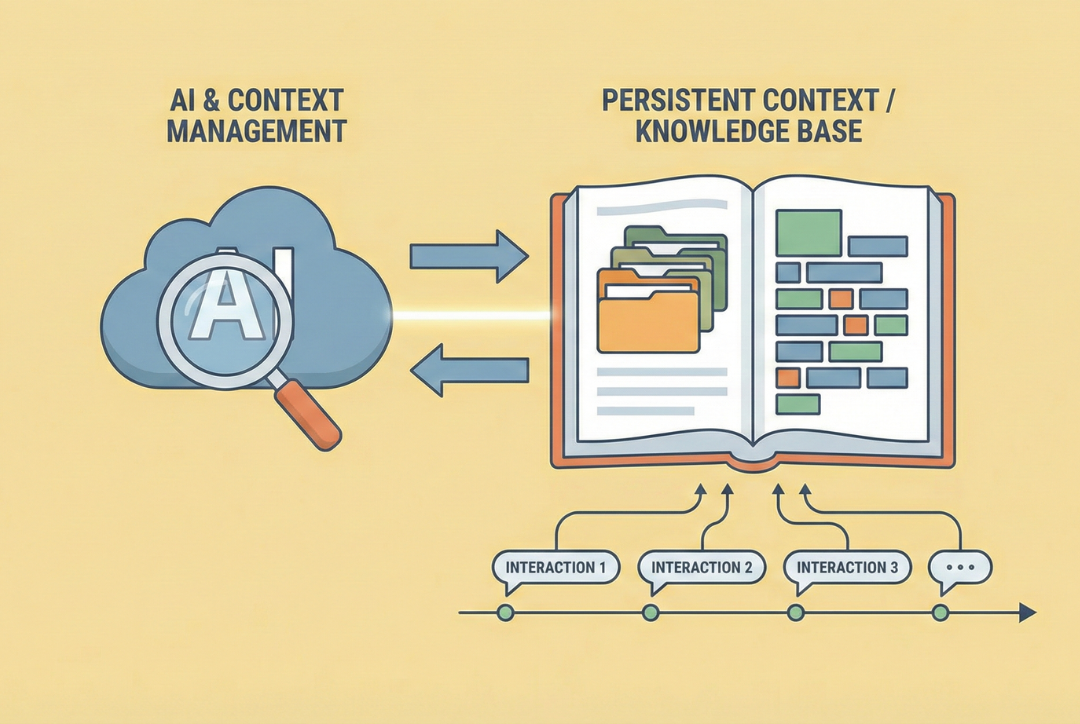
Persistent context is the ability to create a knowledge environment where information survives beyond a single chat session.
From Generic to Grounded
The difference between a one-off chat and a project-based interaction is essential to understand.
In a one-off chat, you might ask: "Help me create a quiz for my thermodynamics class." The AI will generate something generic, drawing only on its general training data. It knows nothing about your specific course, your students' background knowledge, your textbook, your learning objectives, or the topics you've emphasized this semester.
In a project-based interaction, you can upload your syllabus, lecture notes, examples of previous quizzes, and your course learning objectives. Now when you ask for help creating a quiz, the AI generates questions that align with your specific content, match the style and difficulty level of your previous assessments, and target the learning objectives you've emphasized.
This presents a fundamental shift in what AI can do for us.
How It Works: Retrieval Augmented Generation
When you upload documents to an AI project, the system does something sophisticated behind the scenes. It creates what are called embeddings—mathematical representations of the meaning and relationships within your text. The system breaks your documents into smaller chunks and maps each chunk into a high-dimensional space where semantically similar ideas are located near each other.
When you later ask a question, the system searches through these embeddings to find the chunks most relevant to your query. It retrieves those passages and includes them as context when generating its response. This is called context injection, and the overall process is known as Retrieval Augmented Generation, or RAG.
Think of it this way: AI now has two sources to draw from. First, its base knowledge from training on millions of books and websites. Second, your specific documents that it can search through and quote directly. The result is responses grounded in your verified sources rather than general patterns—dramatically reducing hallucinations.
Building Your Knowledge Base
What should go into a knowledge base for teaching? We discussed several categories:
Foundational documents that define your course: syllabus, learning objectives, department curriculum structure, perhaps your teaching philosophy statement.
Content-specific materials that reflect what you actually teach: lecture notes, problem sets, lab manuals, textbook excerpts, relevant research papers from your field.
Assessment materials: examples of previous exams, grading rubrics, sample feedback you've given students. These help the AI match your style and standards when creating new materials.
Student-facing resources: FAQs you've compiled, common misconceptions you've identified, prerequisite knowledge checklists, supplementary materials you've developed over time.
Operational context: institutional policies on academic integrity, AI use, accessibility accommodations—anything that shapes how you teach.
Practical Tips for Better Retrieval
Some simple practices can significantly improve how well your AI system finds relevant information:
Naming conventions matter. A file called "syllabus.pdf" is ambiguous if you teach multiple courses. "MAE3134_Thermodynamics_Syllabus_Fall2025.pdf" tells the system exactly what it's looking at.
Consistent structure helps. If all your lecture notes follow the same format—learning objectives at the top, main content in the middle, practice problems at the end—the AI learns this pattern and can more easily find specific types of information.
Mind the granularity. Very long documents (like a complete textbook) can be less effective than chapter-by-chapter PDFs. But don't over-fragment either—if you upload hundreds of tiny documents, you lose the contextual relationships between ideas. Aim for coherent units where related content stays together.
The Self-Improving Cycle
One of the most powerful techniques we explored is feeding valuable AI outputs back into your knowledge base.
Here's how it works: Suppose you ask your AI project to conduct research on active learning strategies in engineering education. It searches, synthesizes, and generates a comprehensive report. Instead of just using that report once, you save it and add it back to your knowledge base.
Now, the next time you ask about pedagogy or teaching strategies, the AI has access to that prior research as context. You've essentially expanded the project's expertise to include the fruits of its own work.
Over time, your project evolves from a static collection of documents into a dynamic knowledge repository that grows more sophisticated—and more tailored to your specific needs—with each interaction.
Tools of the Trade
We compared how different platforms implement these ideas:
Anthropic (Claude Projects): Powerful for large, ongoing project work. Projects can connect directly to Google Drive, automatically updating when your source documents change. Chats within a project share their own memory, keeping contexts cleanly separated.
OpenAI (Custom GPTs and ChatGPT Projects): Use Custom GPTs for creating specialized "mini apps"—like a tool that reformats CVs into a specific template, or a course-specific assistant. ChatGPT Projects (paid feature) work similarly to Claude Projects.
Google (Gemini Gems): Custom variations of Gemini with fixed instructions and uploaded documents. Google has hinted that fuller "project" functionality is coming.
Each platform has its strengths, and the landscape continues to evolve rapidly. What matters most is understanding the underlying principles: persistent context, grounding, and the retrieval-augmented approach.
A Live Demonstration
During the session, we demonstrated building a Claude Project for conference planning. Starting with a few documents about panel ideas, we showed how to:
- Connect to Google Drive and add documents directly
- Watch the system calculate context "capacity" as sources are added
- Ask the AI to synthesize information across multiple sources
- See how responses reference the specific documents provided
The demonstration made concrete what can otherwise feel abstract: when you build a proper knowledge base, the AI stops giving generic answers and starts working with your materials.
Faculty Members' Experiments
At the start of the session, several faculty members shared results from experimenting with the workflow we demonstrated in Session 1. Using Perplexity and NotebookLM, they had generated lecture slides and infographics for their course subjects.
"The infographics are excellent," reported Prof. Barakati. "Great to be used as one slide to summarize everything," said Prof. Dano. Some slides were directly usable in class, though they noted that exporting to editable formats still requires workarounds.
This is exactly the kind of experimentation we hope to foster—taking the concepts and making them your own, discovering what works for your specific teaching context.
What's Next
Over the coming sessions, we'll build on this foundation to explore:
- Advanced prompt engineering techniques
- Designing AI-resistant assessments
- Building course-specific custom GPTs
- Integrating AI into research workflows
But the core insight from Session 2 will remain central: the difference between AI as a forgetful chatbot and AI as a persistent, knowledgeable assistant comes down to how we structure our interactions and curate our knowledge bases.
As AI Academy Director Prof. Barba commented: this is moving from treating AI as disposable to architecting systems that become more valuable with every interaction.
Watch the Session
An edited recording of the live demonstrations from Session 2 is available on YouTube.
The GW Engineering AI Academy is a strategic initiative to position SEAS as an AI-forward institution through systematic faculty development, anchored in the Entrepreneurial Mindset framework of our KEEN partnership.